AITOOL for Primavera
An assistant inside Primavera v10 that runs only on machines your company controls.
No vendor account, no per-seat licence, no metered credits. The model is yours to choose — OpenAI, Anthropic, OpenRouter or a local one. Free.
PLATFORM
.NET Framework 4.8 + WebView2 (offline)
TOOLS
24 ERP tools
AI PROVIDERS
4 AI providers + any compatible endpoint
LICENSE
Community License (free)
The film
The assistant that works inside Primavera
Two and a half minutes of the product working on DEMOV10, the Cegid demo company, with the published version: the installer, a screen opened by name, real data, the official PDF, the write with a brake, the audit table, a skill that runs a whole process, and where it runs and what it costs.
Three things it does differently
Answers with your ERP, not a summary
Pending items, sales, current account, stock — the query runs now, against your database, with Primavera's own filters.
Acts, but shows you first
Creating or changing goes through a preview validated by the ERP; it saves only from the confirmation card you click, and the save is recorded.
Runs where you decide
On your machine, against your server, with the model you choose — including a local one that never leaves the building.
The assistant in action
Real captures of AITOOL running inside Primavera, on Cegid's demo company (dark theme). Every number on screen came from the ERP in that session.
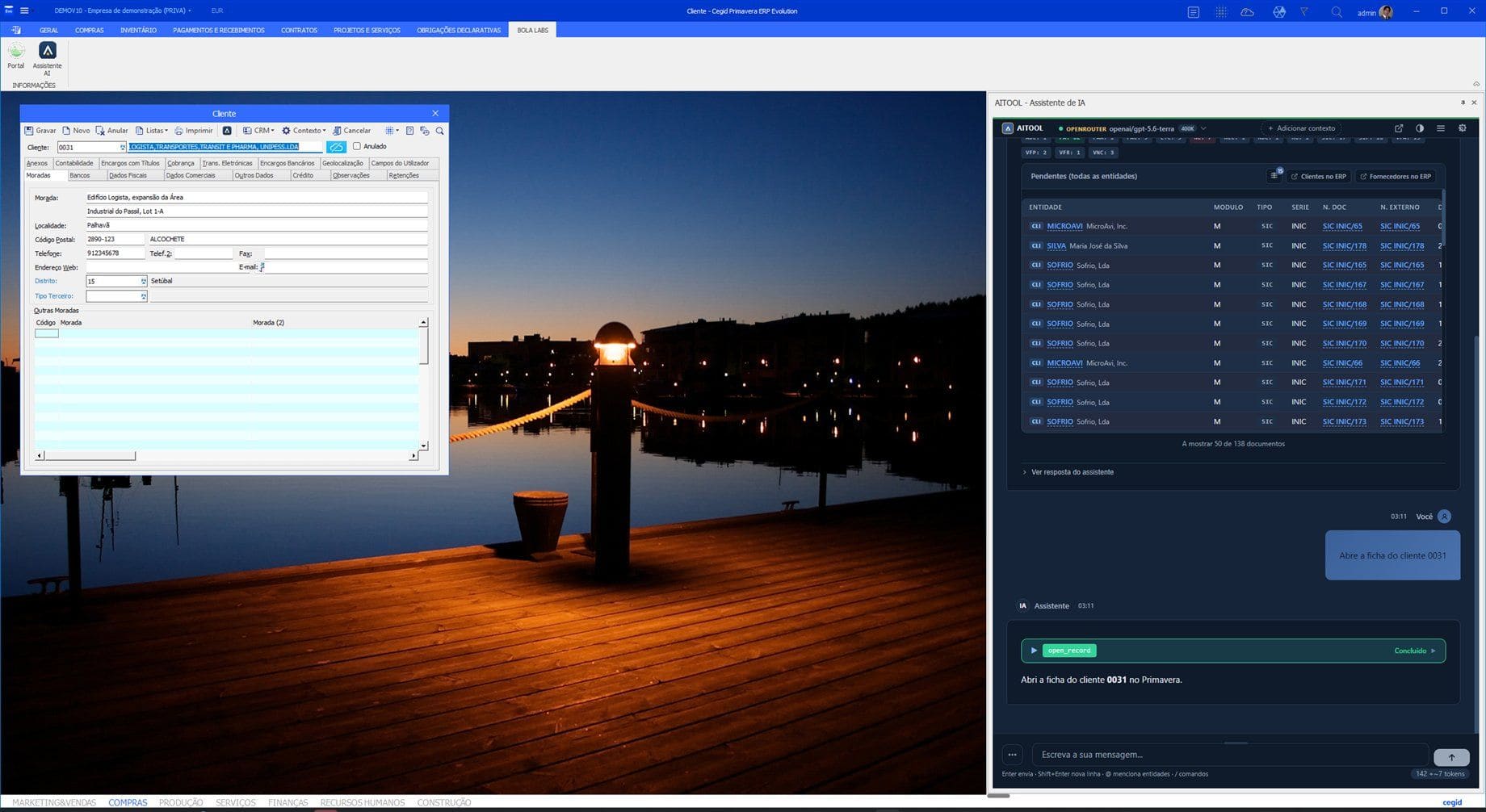
The assistant docked beside the record it just opened 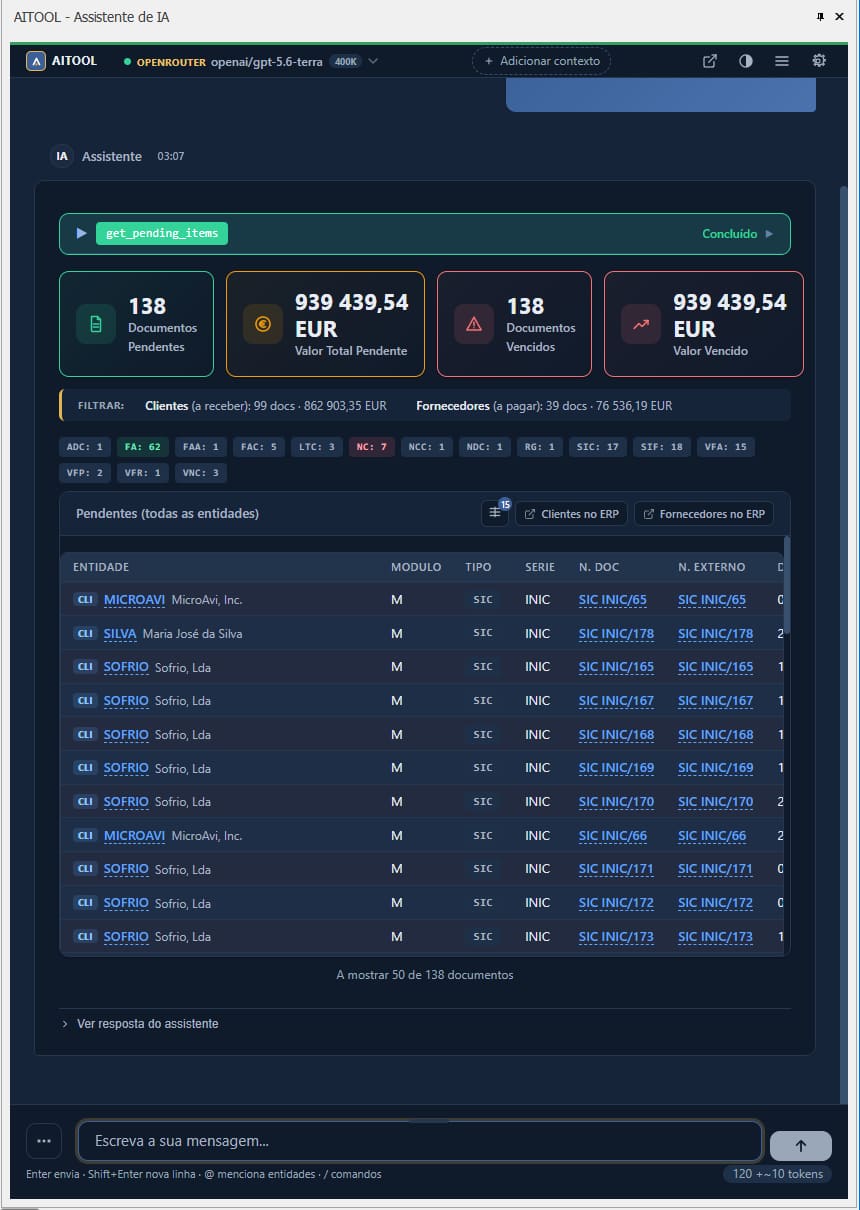
Pending items as cards and a live table — the same ERP query, nothing exported 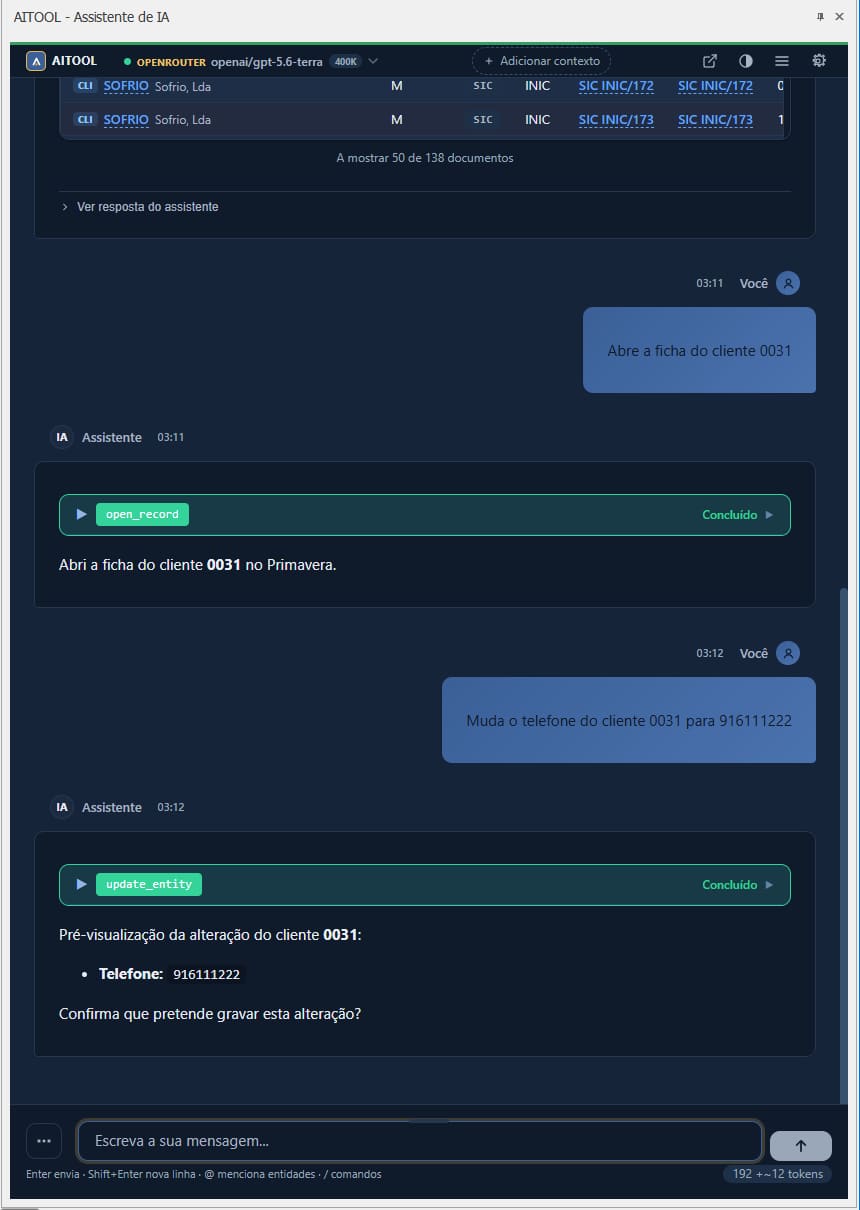
A change previewed by the ERP; it is only saved from the card 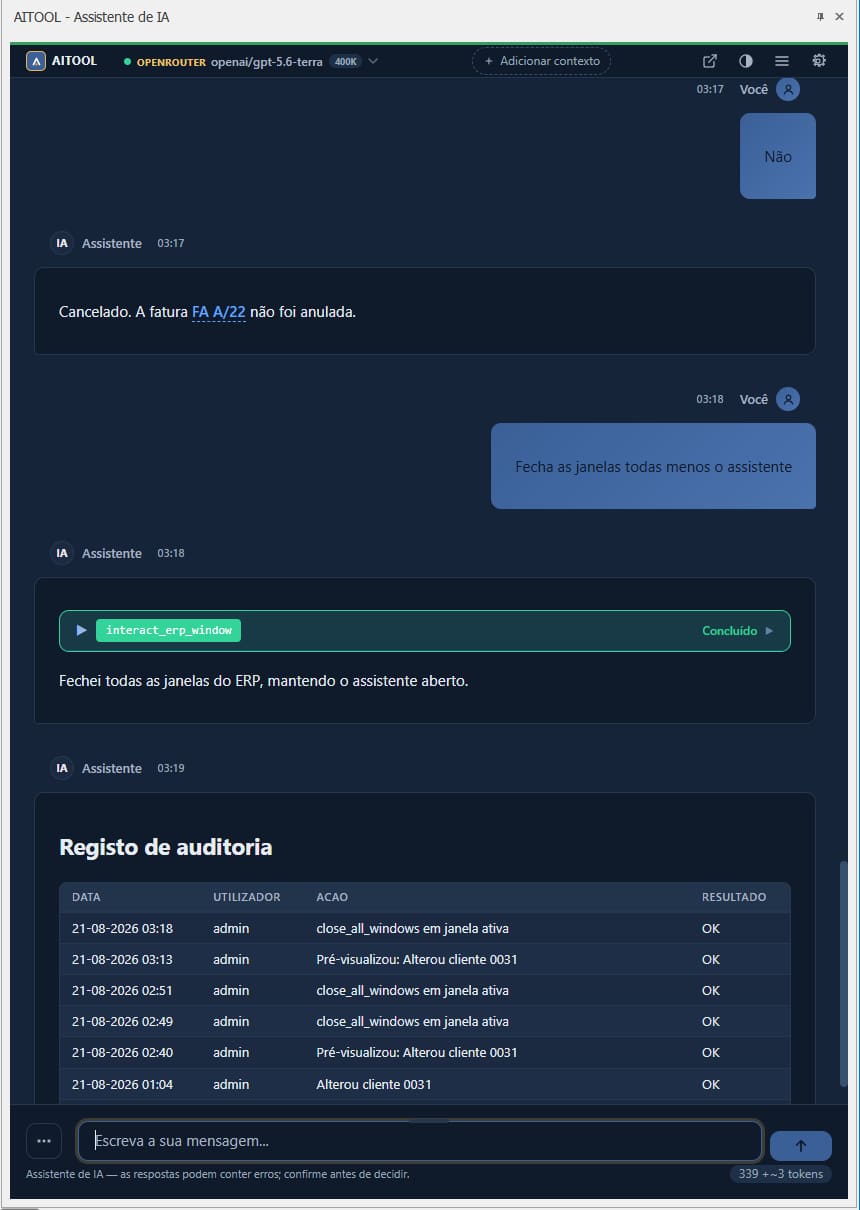
Every save, refusal and failure lands in AI_AuditLog, in the company database 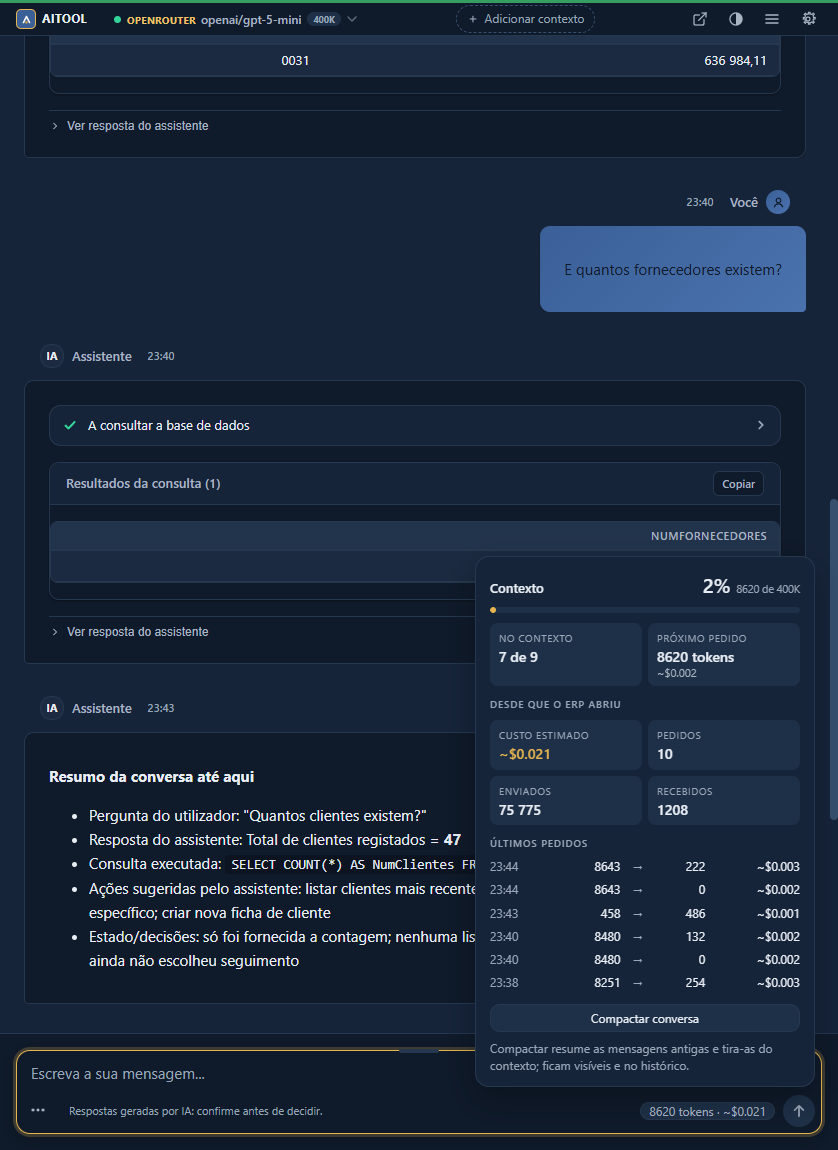
Context, tokens and cost per request — and one click to compact a long conversation


Anatomy of a turn
ERP AUTOMATION
Find any screen in plain language
Primavera has hundreds of functions spread over navigation contexts. AITOOL reads the ribbon catalogue of your installation and opens what you ask for by name — whatever the installation has.
- Opens any ERP function from the ribbon catalogue, across every navigation context — Accounting, Treasury, HR, whatever is installed.
- Opens records and account statements in their native editors.
- Drives open windows: fills fields and grid cells, clicks buttons and tabs, reads dialogs, closes windows — on .NET windows and on the legacy VB6 editors, through UI Automation.
- When it opens a function, the cursor glides to the visible ribbon button, so you learn where the screen lives.
Things people type
- Open customer 0031's file and their pending items
- Open the sales explorer
- List the fields of the open customer window
- Close every window except the assistant
The interface is Portuguese; the assistant answers in the language you write in.
Another way in
People who do not know where a screen lives, and people who work better by text, use the ERP through a sentence. Voice is on the roadmap; it is not a feature today.
What it does
24 tools, auto-discovered. Some only read, some drive windows, some write through the ERP's business objects.
Reads
Pending items with the ERP's own query, shown as KPI cards and a live table; sales and purchases analysis; balances with aging; stock by warehouse; document and entity search; guarded read-only SQL.
Drives the ERP
Opens any function by name, opens records and statements, fills fields and grids, clicks buttons, reads dialogs and closes windows — .NET and VB6 alike.
Writes, behind a confirmation card
Customer and supplier files, sales documents, updates. The preview is validated by the ERP itself and becomes a confirmation card whose button carries a single-use authorisation the model never sees, so nothing is saved unless a person clicks. Every save, refusal and failure lands in AI_AuditLog — /auditoria shows it in the chat — and an open file that went stale gets a notice.
Documents
The official Crystal PDF of the series' report, opened by itself; ATCUD and QR code are the ERP's. When the series has no report, an amber warning says so.
Data quality
Enriches a file by tax id from VIES and NIF.pt, with a field-by-field diff before anything is written, and validates tax ids per country.
Web search
Five providers — Tavily, Brave, Serper, Exa or a self-hosted SearXNG — with your own key; results are marked as untrusted content.
Row menus on results
Right-click a row of a result table: open in the ERP, generate the PDF, open the record, show its pending items.
Cancel under a second
Stop mid-answer and the tool call stops with it. Follow-up chips suggest the next question.
Supervisor view
Audit trail and conversation history for every user, for ERP administrators and technicians; everyone else sees only their own.
History in your database
Sessions live in the company's SQL Server, with search and rename; conversations export to Markdown, HTML or plain text.
The 24 tools
- 01Entity search
- 02Entity details
- 03Pending items
- 04Account balances
- 05Document queries
- 06Sales analysis
- 07Stock checks
- 08Document rendering
- 09Guarded SQL
- 10Opening records
- 11ERP functions
- 12Window interaction
- 13Printing
- 14Sales document types
- 15Sales document series
- 16Article prices
- 17Entity creation
- 18Sales-document creation
- 19Web search
- 20Entity updates
- 21Entity enrichment
- 22Skills (SKILL.md workflows)
- 23CRM sales opportunities
- 24E-mail drafts
INSTALLATION
Install once, every workstation gets it
A normal Windows setup — download, next, next, done. What it does for you, in order:
- 01
Finds the Primavera installation by itself: environment variables, then the registry, then a previous install, and only then asks.
- 02
Detects multi-instance ERPs and lets you pick one or several.
- 03
Registers the addon in the ERP's Extensibility screen by itself — as a common extension or per company. No manual ERP configuration.
- 04
Uninstalls cleanly: the same state removes the registration on the way out.
Client-server installs
The ERP lives on the server and the workstations reach the shared SG100 folder through a Windows share. Run the setup once where SG100 lives and every workstation picks it up at its next start. Workstations need only the Edge WebView2 runtime, which Windows 10 and 11 typically already carry.
For IT
Silent mode with the instances, SQL Server and registration scope as parameters. The SHA256 is published with every release.
Download the latest versionThe .sha256 file sits next to the setup in every release.
We are not aware of another Primavera addon with a self-registering installer.
PRIVACY
AI without strings
The model is a setting, not a subscription. Where your data goes is your decision.
- OpenAI, OpenRouter, native Anthropic, or any OpenAI-compatible endpoint — compatible with LM Studio for a local model, where nothing leaves the building. Out of the box it runs on OpenRouter with GPT-5.6 Sol; the model is a setting.
- The key is encrypted per Windows user (DPAPI) and sent only to the provider you chose.
- No Bola Labs server in the path. The addon talks to your ERP and to your provider, nothing else.
- Chat history stays in your SQL Server; the audit table is in your company database.
- Declares itself an AI system on the welcome screen and under the message box (AI Act, article 50).
Requirements
- Licensed Primavera v10.20 or later — Evolution or Executive (Professional installs on the same rules, pending a customer confirmation)
- .NET Framework 4.8
- Edge WebView2 runtime (typically already on Windows 10/11)
- SQL Server
- At least one AI provider key — or a keyless local endpoint
Plans
Community
Free
Full assistant, self-hosted. Bring your own API key (OpenAI, Anthropic, OpenRouter, an OpenAI-compatible endpoint or local).
- Full streaming chat + ERP tools
- BYO API key — all providers
- Free for any use, unlimited seats, community support
Enterprise Pro
For companies with an SLA
For companies requiring SLA, white-label/OEM licensing and guided deployment.
- White-label & OEM licensing
- Guided deployment & configuration
- Priority support with SLA
Frequently asked questions
Do I need a Primavera license to use AITOOL?
Which AI providers can I use?
Is it safe for ERP data?
Can I get official documents from the chat?
How much does it cost?
Do I need a partner to install it?
Does it work with my old VB6 screens?
Can it run without internet?
Can I teach it my own process?
Next step
Ready to put AI to work inside Primavera?
Talk to us to understand what makes sense for your installation.
AITOOL is free to use. If it saves you time, support it with a star on GitHub, with an issue when something breaks — or hire us for the deployment.
See also: Community Platform